Mathos AI Vs. Opennote.ai: Which AI Math Tutor is Better for Students
Thursday, May 15, 2025
A math homework helperxxx promises you confidence for any math challenge. Meet Mathos AI – an AI math tutorxxx built to empower students at every level. Another one is Opennote.ai, founded by students, which will specialize in a chat Feynman model, supplemented with dynamic video content, and it will fit ideally into Notion, Google Workspace, and GitHub. Which AI math tutor is better when you need to solve your math assignments?
- Mathos AI is like having a math-ready expert at your disposal with no need to go any further than his pocket. Snap, scribble, type, or talk about your math problems – Mathos AI answers your chosen manner with direct instruction as you learn. It teaches you how to approach complex geometry proofs, penetrate Laplace transformsxxx, or go through statistics. Step-by-step visuals conferred and interactive quizzes for each answer are provided by the Mathos AI, which clarifies every answer, and the Mathos PDF Homework Helperxxx can also accurately review PDF assignments. Your performance, regardless of the device, is updated immediately with no fuss.
- Opennote.ai? It was built by students, for students, and excels as an all-purpose learning companion—offering AI-powered explanations across math, biology, and finance, seamless integrations with Notion, Google Workspace, and GitHub, plus dynamic video generation and interactive coding space.
So, which tool deserves a permanent spot in your study routine? We’ll see which can solve problems better, provide the best educational support, accept a variety of inputs, and work the best in real life to enable you to choose the best AI assistant for your math studies. Ready to inject your learning process with state-of-the-art tools?
Stay tuned! Then, we’ll compare Mathos AI with Solvely.AI, StudyFetch, and Microsoft Math Solver to discover the best choice for math problem-solving. Information in Mathos AI’s blog includes expertly written math concept explanations, insightful AI tool comparisons, practical learning math tips, and up-to-date news about AI-driven learning of math skills.
Side-by-Side Comparison Between Mathos AI and Opennote AI
What They Both Offer
- AI-Powered Step-by-Step Explanations
- Interactive Whiteboard/Canvas
- Graphing and Visualization Tools
- Dynamic Video Tutorials
- Personalized Practice Problems
How They Differ
| Feature | Mathos AI | Opennote AI |
|---|---|---|
| Depth of Math Coverage | Specialized calculators for algebra, trigonometry, calculus, differential equations, matrix operations, graphing (via Desmos integration), etc. Rigorously tested for accuracy. | Covers any topic by leveraging Feynman and Turing explain concepts clearly and your personal note database—but lacks built-in symbolic math engines or graphing integrations. |
| Input Methods | • Photo (worksheet, handwritten) • Freehand sketch on in-app whiteboard • Text/typed questions • PDF upload via PDF Homework Helper | • Typed queries in chat interface • File uploads (PDF, DOCX, etc.) to reference within chat • No dedicated camera-scan math solver |
| Solution Style | • Step-by-step textual breakdowns with optional visuals • Interactive video tutorials that walk through each problem visually • Synchronized, multi-device progress tracking | • Chat-based explanations anchored in your own notes • AI-generated videos (e.g. “Feynman” persona) that narrate and illustrate concepts |
| Interactive Tools | • AI whiteboard for sketching and annotating problems • Adaptive quizzes and personalized learning paths based on performance | • “DeepTutor” chat sessions tied to your notes • Draw sketches or code on Canvas without leaving • File-based Q&A drawn from your own uploaded textbook excerpts |
| Additional Learning Aids | • Curated external resources (e.g. YouTube clips) based on core concepts • PDF Homework Helper that auto-detects and tags all problems in a PDF | • Note organization (tagging, sharing, journaling) • Web search available |
| Pricing & Access | • Free tier with core solver; • Premium plans unlock unlimited PDF uploads, video tutorials, and multi-device sync (pricing on request). | • Free: limited daily chat messages, 3 “DeepTutor” uses, 5 file uploads per day • Premium ($15/mo): unlimited chat, video gen, file analysis, DeepTutor uses |
- Mathos AI: Dedicated AI math tutor and solver focused exclusively on math: from algebra to proofs, antiderivative, convergence, eigenvalue, and graphing. Best for students seeking a highly accurate, math-focused tutor that solves complex equations, visualizes graphs and integrates directly with homework PDFs.
- Opennote.ai: General-purpose AI-notes platform with built-in “DeepTutor” chat, note-management, and interactive video explanations—covers many subjects, including math. Best for students wanting an all-in-one note-taking and study-assistant platform where AI explanations are woven into personal notes and video snippets.
Depth of Math Coverage: Opennote.ai Has Multi-Disciplinary Support
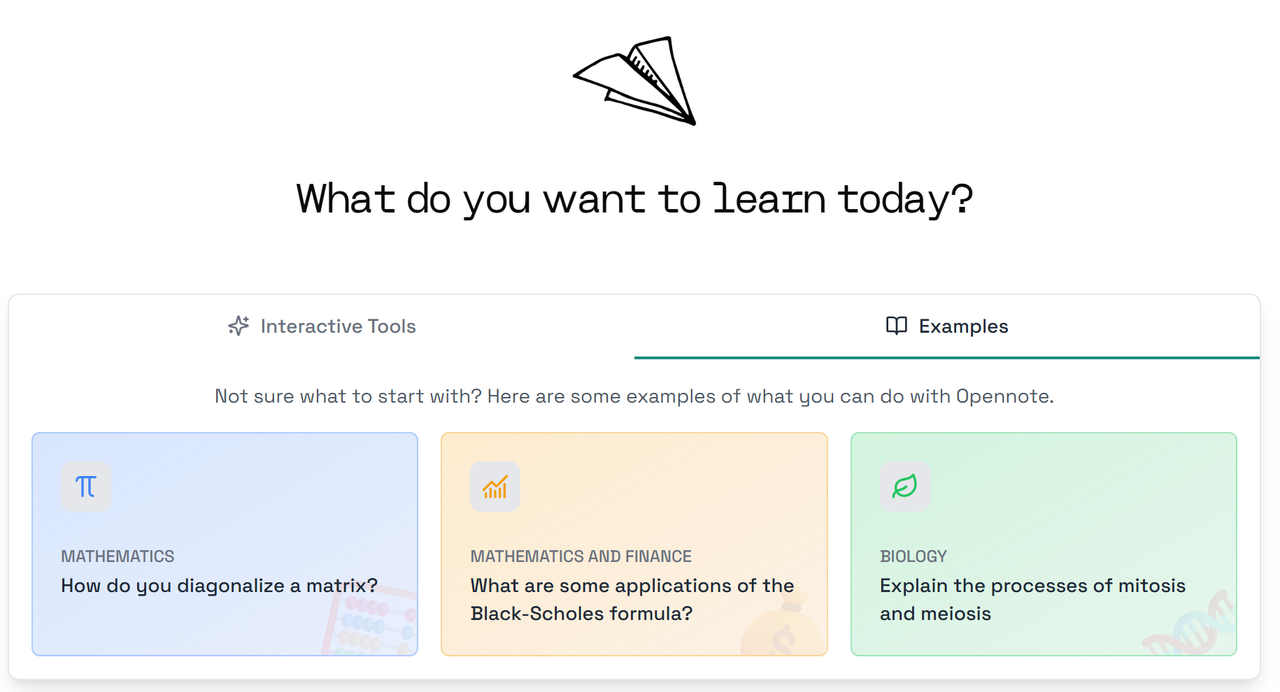
Opennote.ai is like a smart study buddy that helps you in lots of subjects—math, biology, finance, and even coding. Its AI models, Feynman and Turing, can explain tricky ideas, draw graphs, and even make videos that teach you step by step. You can ask Feynman to show you a graph with a simple “@Graph” command or generate a quick video lesson with “@Video.” If you’re stuck on code, Turing gives you a live coding space to practice, debug, and run tests.
Depth of Math Coverage: Mathos AI is Strong on Math
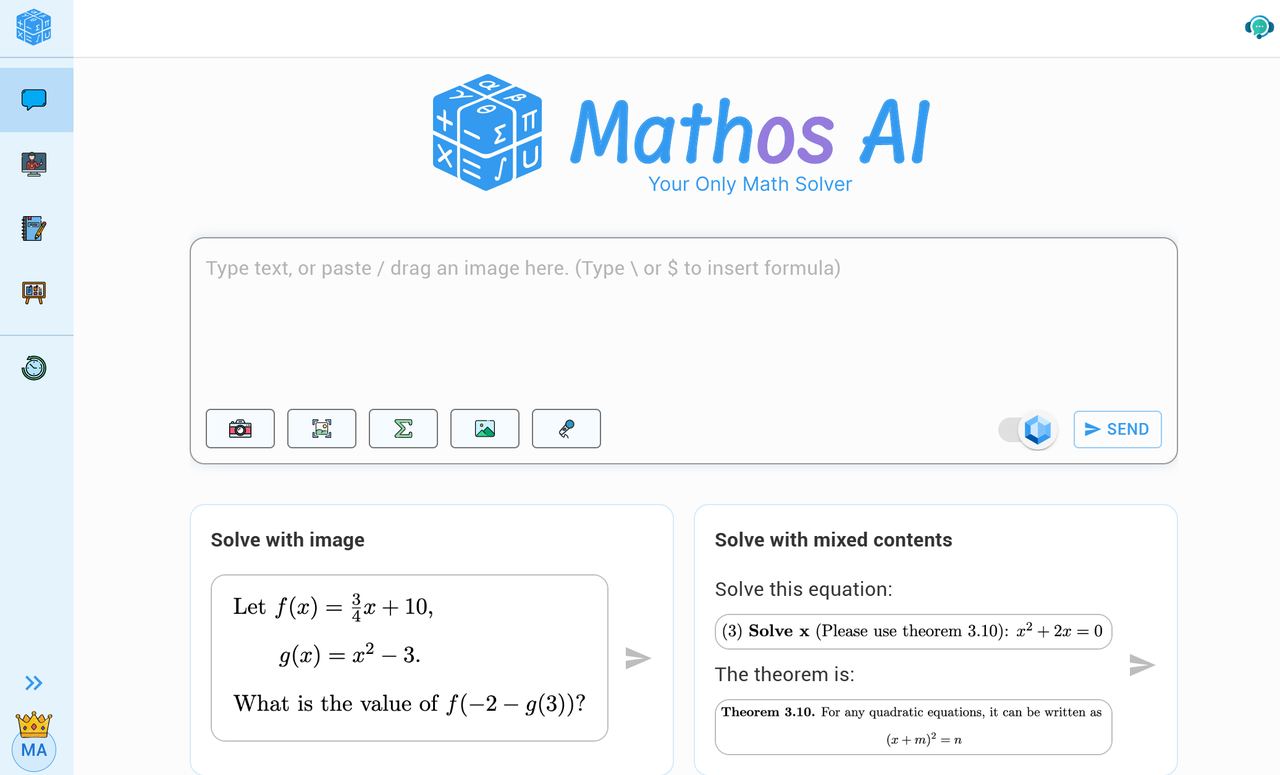
Mathos AI focuses entirely on math, from basic fractions to advanced scientific notation and polynomial equation. It doesn’t just give answers—it breaks each problem into clear, easy steps so you really understand what’s happening. You can type, speak, or snap a photo of a math problem, and Mathos AI will solve it with precise explanations. Its special graphing calculator shows you the curves and shapes you learn about in class, and it has comprehensive dedicated calculators for every math topic. Because Mathos AI is built just for math, it offers deeper, more accurate help than a general study tool when you need to master your math homework.
Input Methods: Opennote.ai Allows Various Uploading Formats
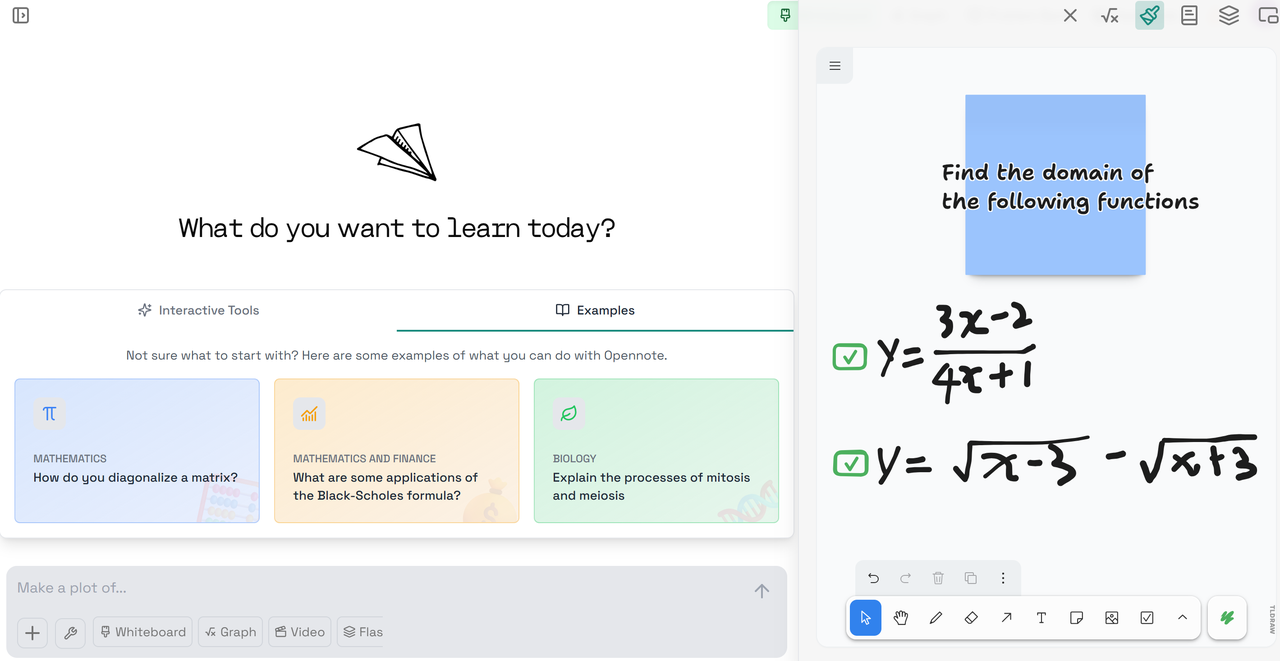
Opennote.ai gives students a flexible way to learn by letting them upload content through multiple tools they may already use. With smooth connections to platforms like Notion, Google Workspace, and GitHub, students can bring in study notes, homework files, and even code from their everyday school tools. While it works great with typed input and supports interactive learning using a virtual whiteboard, it mostly depends on tools you’re already using to bring in content, rather than offering built-in ways to take in all kinds of questions on the fly.
Input Methods: Mathos AI Offers Versatile Ways to Ask New Questions
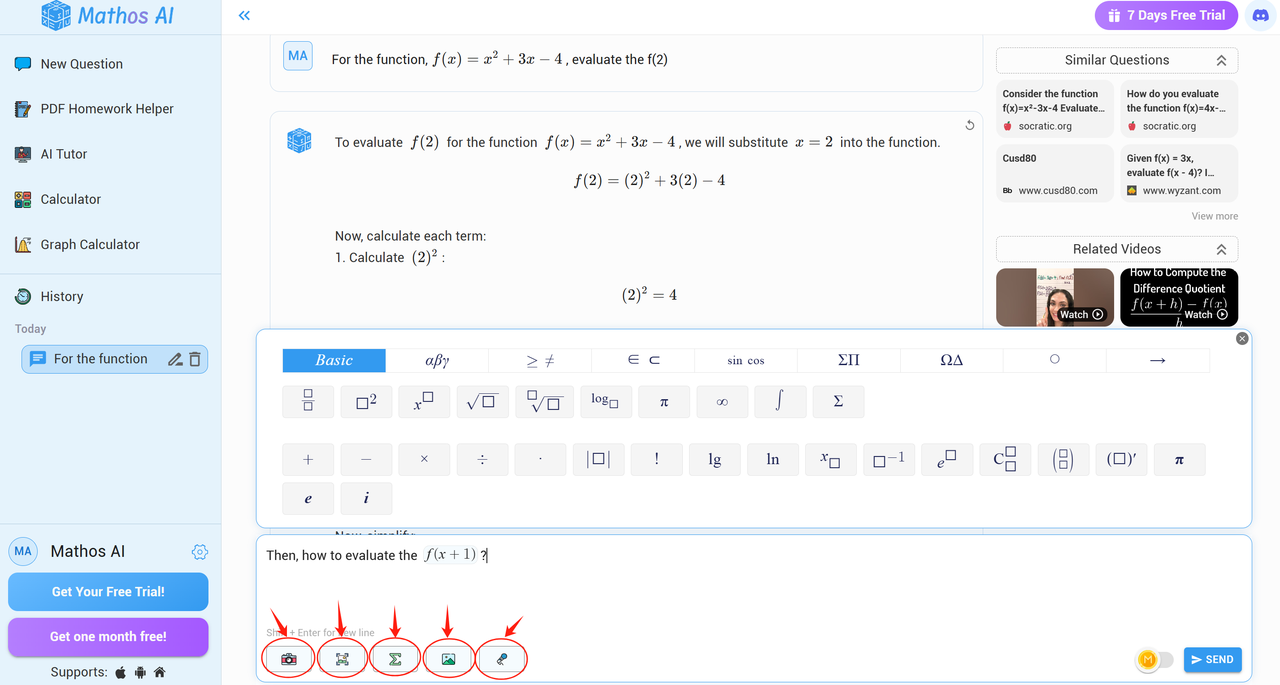
Mathos AI stands out by giving students total freedom in how they ask for help. You can snap a photo of your handwritten homework, draw a math problem using your finger, upload full PDF worksheets, or simply type or say your question out loud. It's like talking to a real tutor who understands you however you choose to communicate. For younger learners, it removes the pressure of perfect formatting or typing and lets them use pictures or voice—whatever’s easiest. Mathos AI also goes beyond just reading your input—it lets you change angles, numbers, or shapes mid-problem and instantly updates the solution. With this, students can explore and learn step by step, in real-time, without feeling stuck.
Solution Style: Opennote.ai Provides Chat-based Explanations
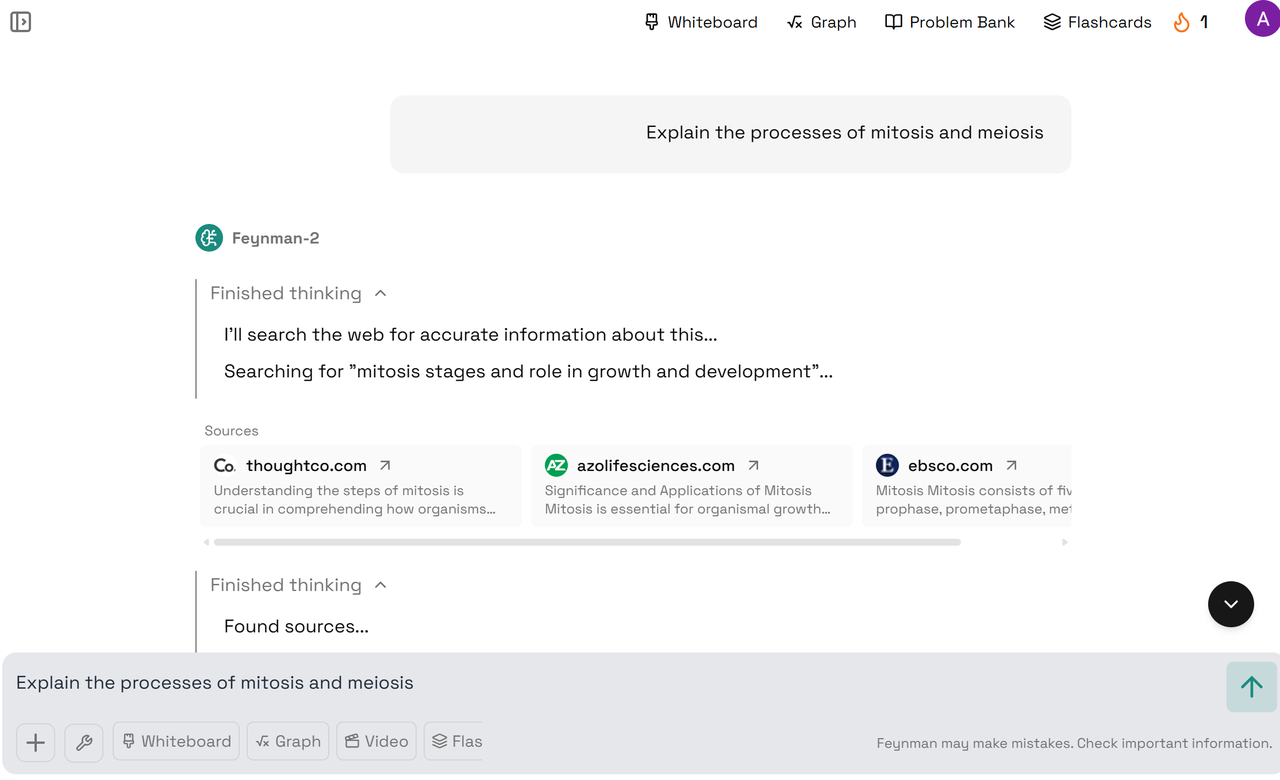
Opennote.ai acts like a friendly study buddy you can chat with. You type your questions or paste into notes, and the AI “Feynman” responds with clear, step-by-step answers right in your chat window. If a picture or a graph helps, you can use simple commands like @Graph or @Video and Opennote will instantly generate a short, narrated video that illustrates the idea. This chat-first approach is great for quick back-and-forth questions and for weaving explanations directly into your notes.
Solution Style: Mathos AI Offers Various Solution Forms
Mathos AI goes beyond just chat: it turns every solution into an interactive lesson. After you snap a photo, draw, type, or speak your question, Mathos gives you a full written breakdown plus a real-time video that walks through each step.
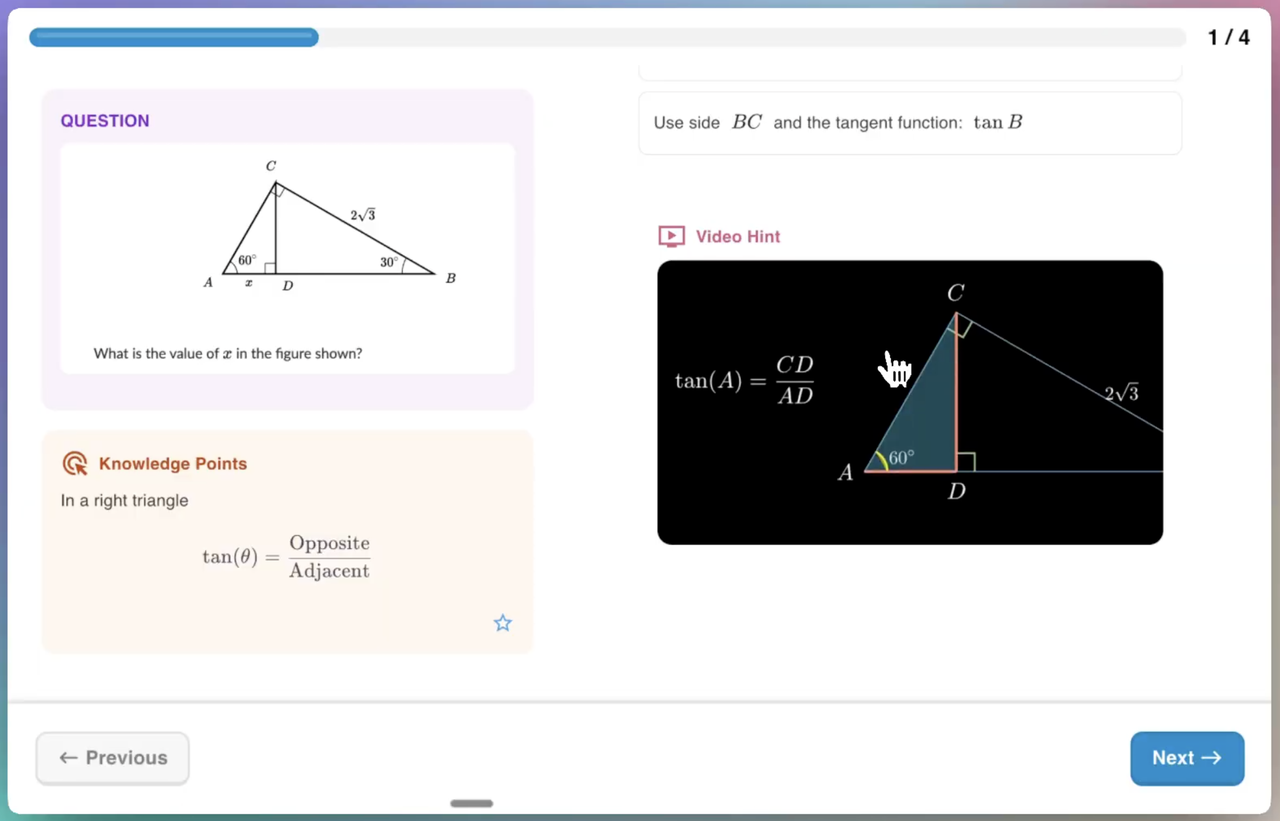
You can click on any part of that solution to tweak numbers or change shapes—and Mathos instantly updates both the text and video. This mix of editable text, on-demand visuals, and personalized pacing helps you explore different problem-solving paths, making it feel more like a live tutor guiding you through every twist and turn.
Interactive Tools: Opennote.ai Has "DeepTutor" at Its Core
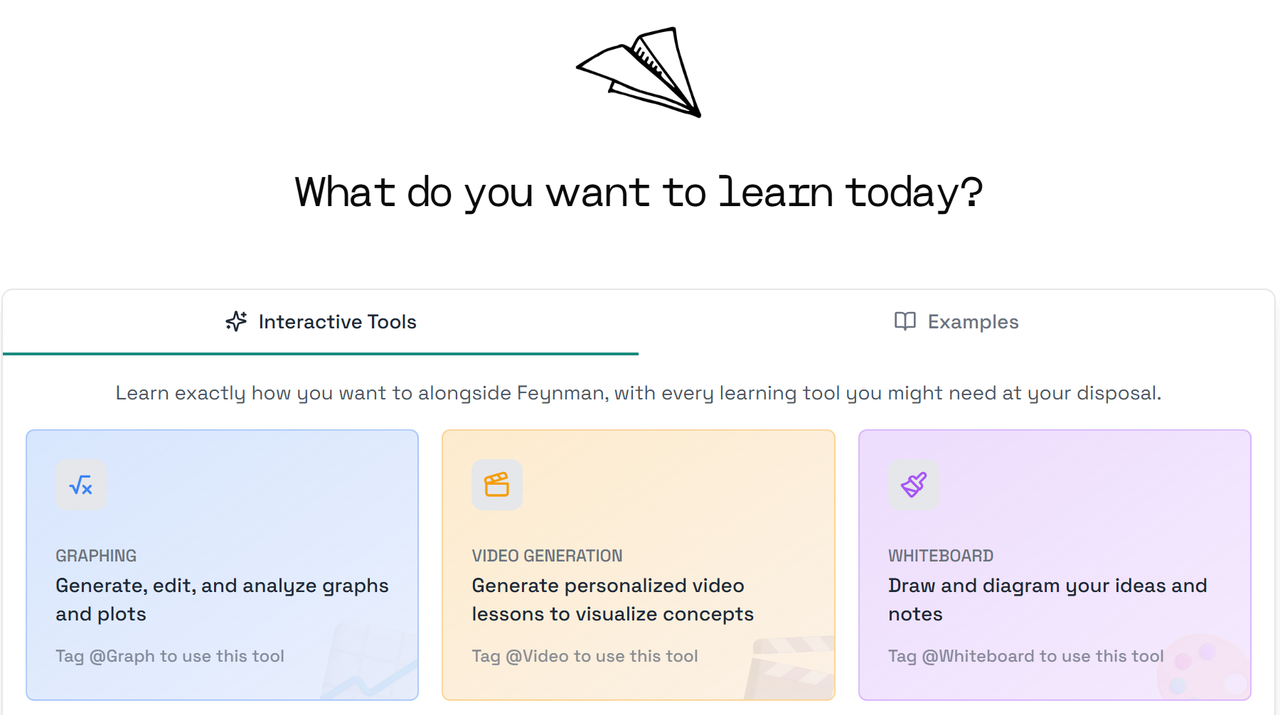
Opennote.ai’s main interactive tool is called DeepTutor. With DeepTutor, you can draw on a virtual whiteboard or plot graphs right inside the app. As you sketch equations or diagrams, DeepTutor watches and writes back, adding notes or new visuals in real-time. If you need a graph, just plot it and DeepTutor will suggest improvements or highlight key parts—turning abstract formulas into moving pictures you can explore. This makes it easy to brainstorm ideas, see math come alive, and get instant feedback on your work.
Interactive Tools: Mathos AI Offers AI Tutoring and Whiteboard
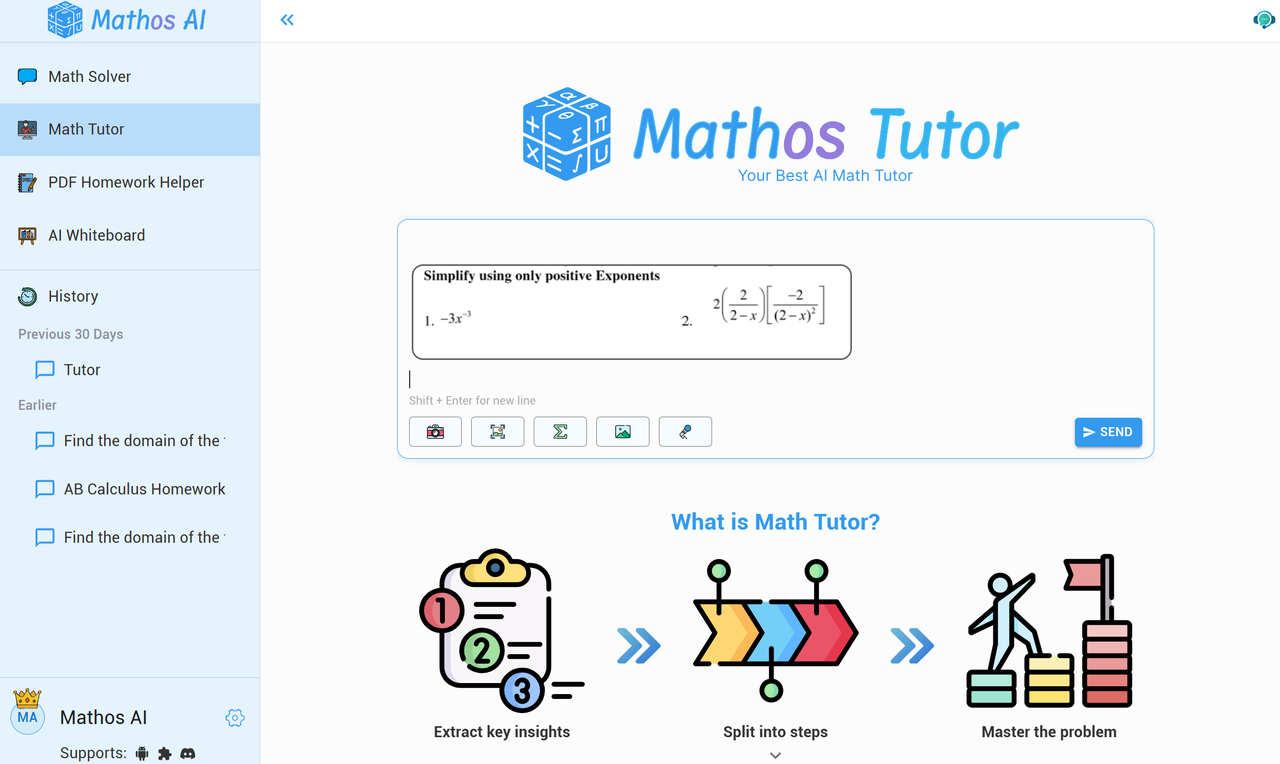
Mathos AI combines a smart AI tutor with a flexible whiteboard designed just for math. You can sketch problems, type questions, or even speak loudly—and the tutor reads your handwriting and voice inputs right away.
See how it works exactly in this video:
As you work, Mathos AI adapts to your learning style, breaking big ideas into bite-sized steps or diving deeper if you’re ready for a challenge. It also gives you quick quizzes—multiple choice or short answer—built around the lesson you’re studying.
With Mathos AI, you get a live, interactive tutor any time of day, plus a whiteboard that reacts to your every move and helps you practice until you really understand.
Additional Learning Aids: Opennote Works Beyond Chat
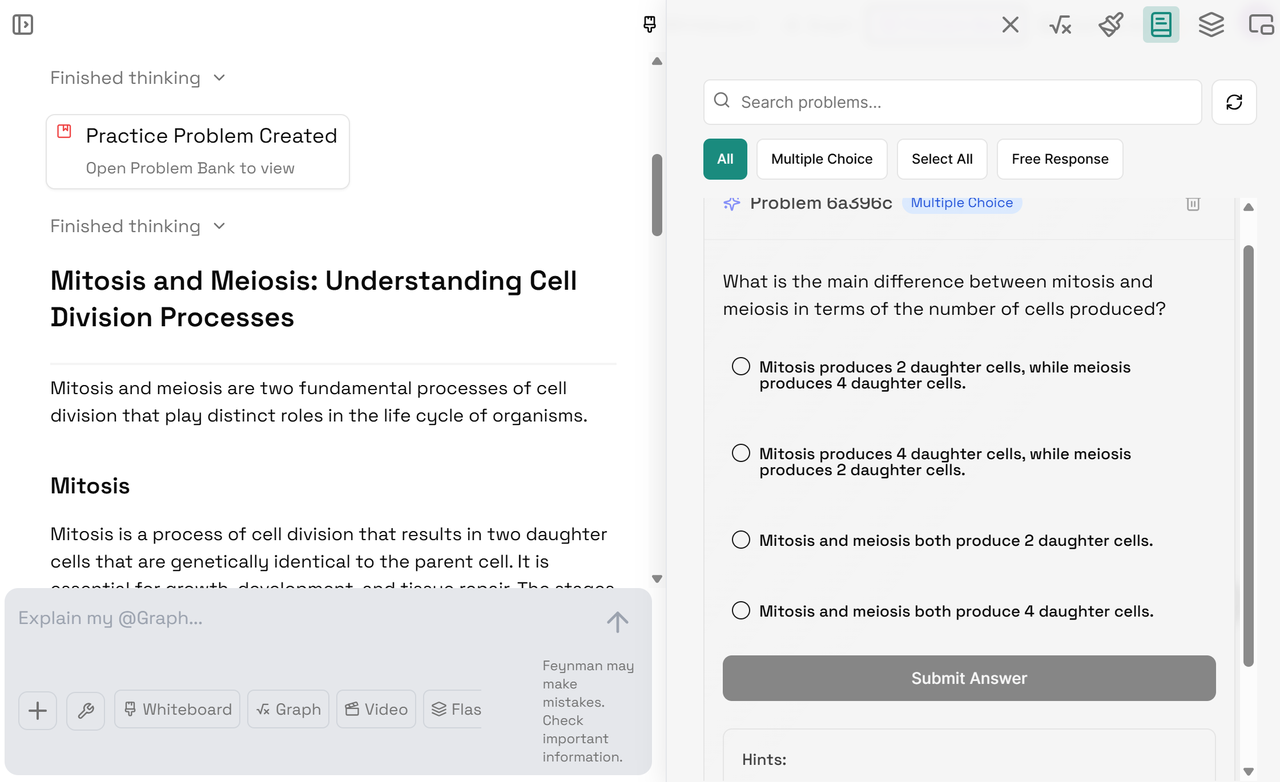
Opennote.ai’s DeepTutor supports your learning with built-in practice and research tools. You can tackle personalized practice problems that adapt as you improve—DeepTutor remembers which topics you struggle with and serves up just the right challenges. If you want to make your own quizzes, Opennote connects with Google Forms and Notion so you can build, solve, and organize question sets all in one place. Need background facts? Its educational search engine finds reliable, fact-checked information and highlights credible sources, helping you turn scattered web results into a clear, trustworthy explanation. Plus, every problem you generate during your chat sessions is saved in a Problem Bank for easy review and study later.
Additional Learning Aids: Mathos AI Goes Further as A One-Stop Hub
Mathos AI goes further by pairing hand-picked lessons with powerful math tools. After identifying the core concept in your question, Mathos AI pulls structured video and text explanations from expert instructors—so you don’t get a random link list but a clear, step-by-step lesson at your level.
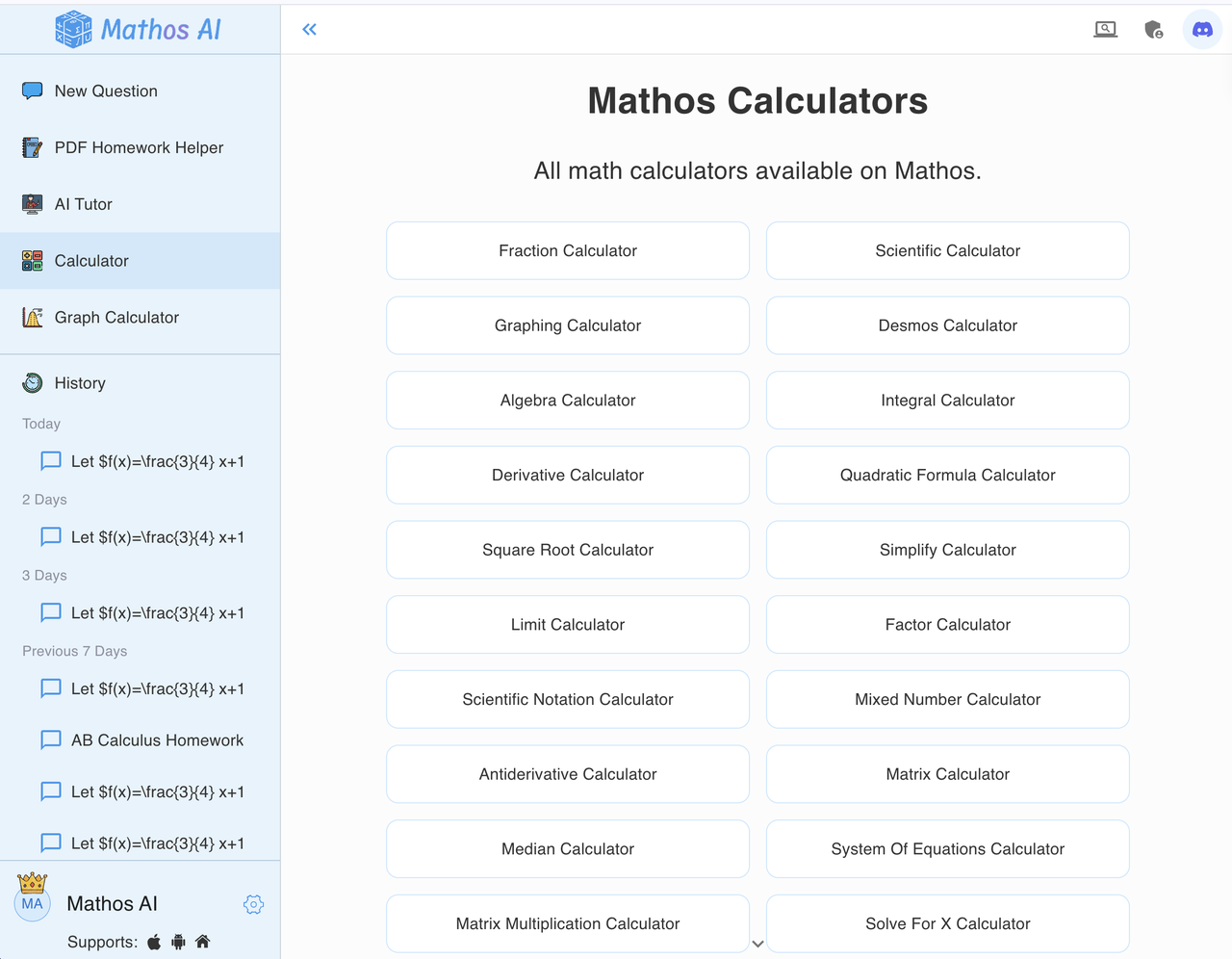
It also includes free, specialized calculators (from fraction simplifiers to Laplace transform math solvers) that cover every math topic without requiring an account.
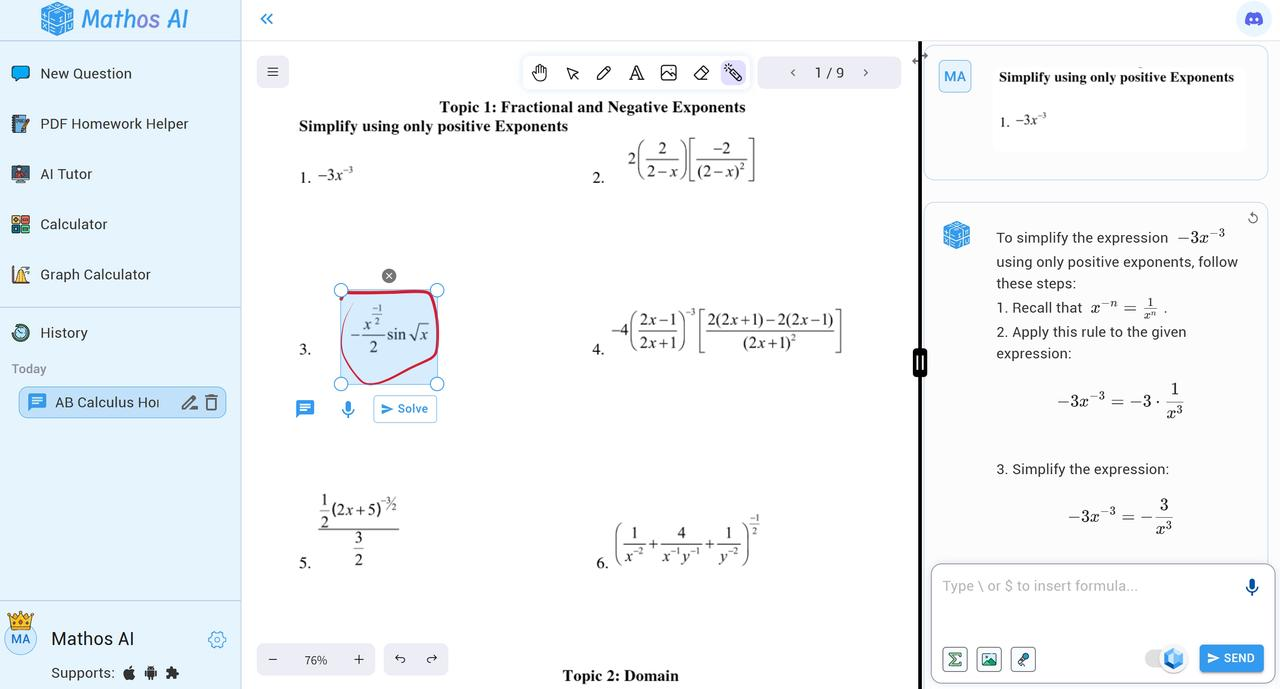
When you ask a question, Mathos AI curates extra learning resources—like short clips from top educators—and lets you circle problems on PDFs, annotate solutions, and save notes in a digital notebook. This dynamic mix of expert guidance, targeted practice, and flexible whiteboard annotations makes Mathos AI a one-stop hub for mastering math concepts.
Real-World Question Test: See How Mathos AI and Opennote Explain Math Concepts for You
Question: "How do you diagonalize a matrix?"
Opennote's explanation:
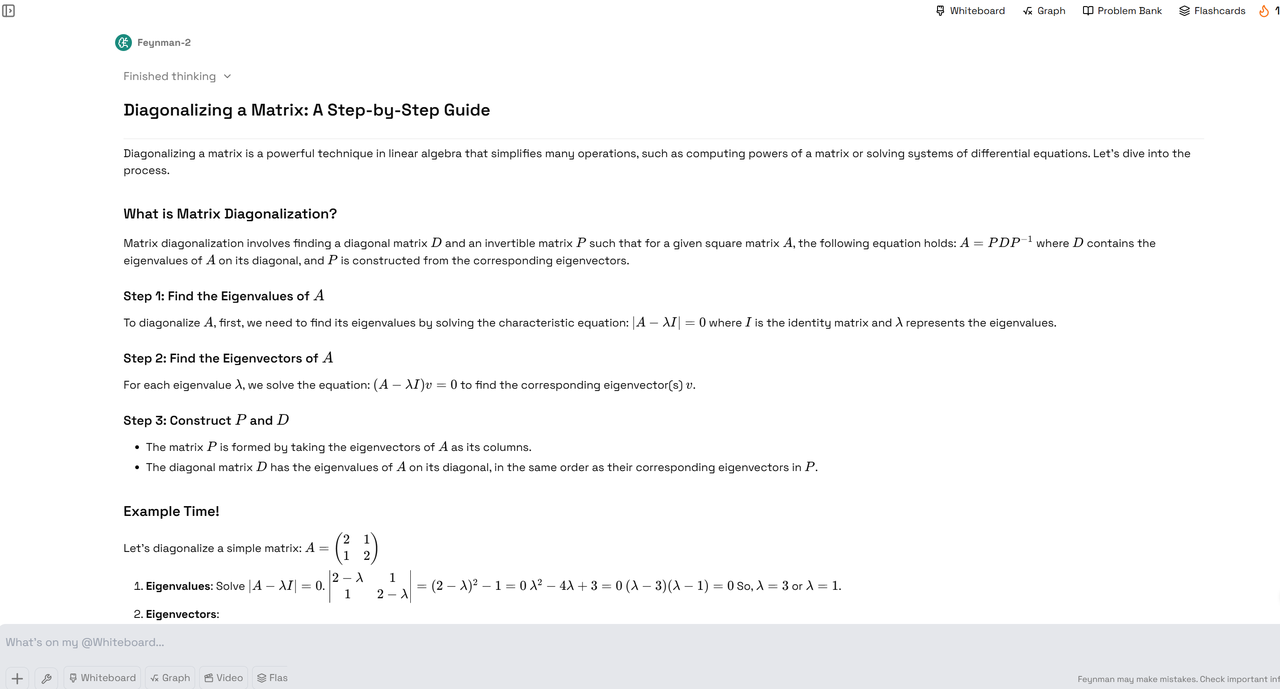
Opennote starts right away by explaining what matrix diagonalization is and why it's useful. It jumps into the steps. So, it seems pretty ready to teach you. Opennote uses clear headings for each step ("Find the Eigenvalues of A," "Find the Eigenvectors of A," "Construct P and D"). It also uses simple language in the beginning. However, when it gets to the math equations like, it might be a bit confusing for younger elementary students who haven't learned about these symbols yet. For older students, it's clearer. The example provided helps to make it more concrete. Opennote's explanation is accurate and well-structured for someone who is starting to learn about matrix diagonalization, especially older students. For younger elementary students, the explanation might need to be even simpler, maybe using more analogies and fewer mathematical symbols initially.
Mathos AI's explanation:
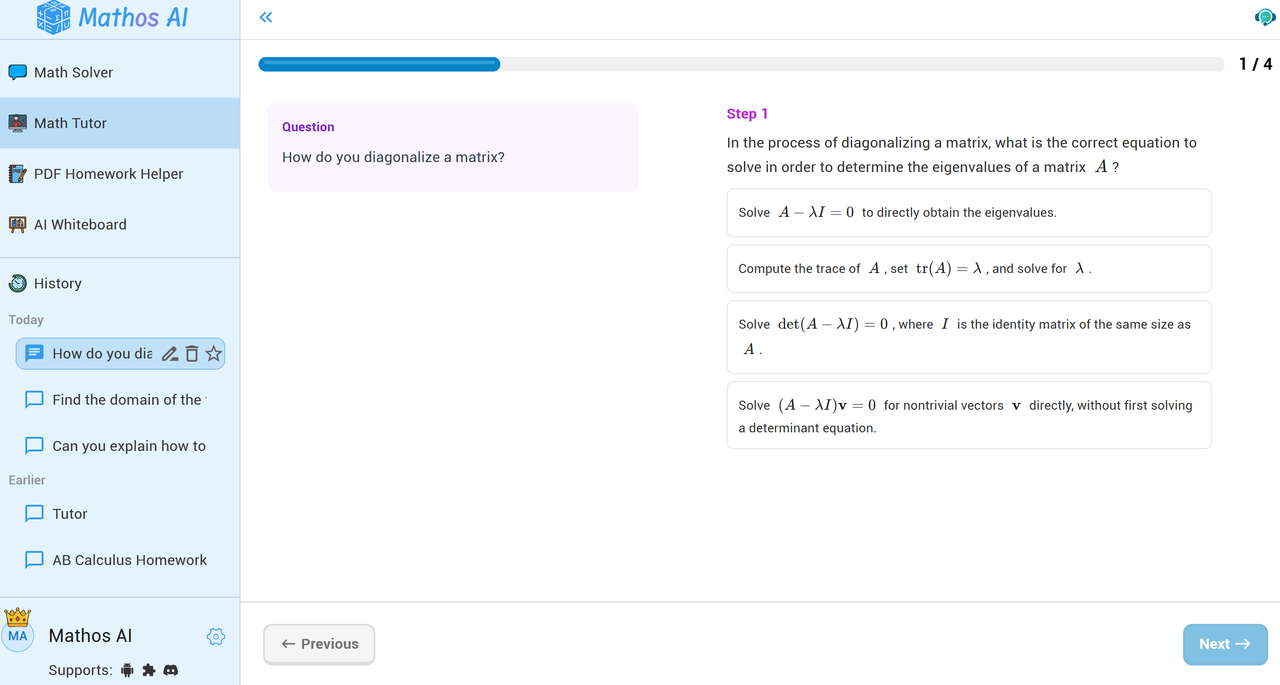
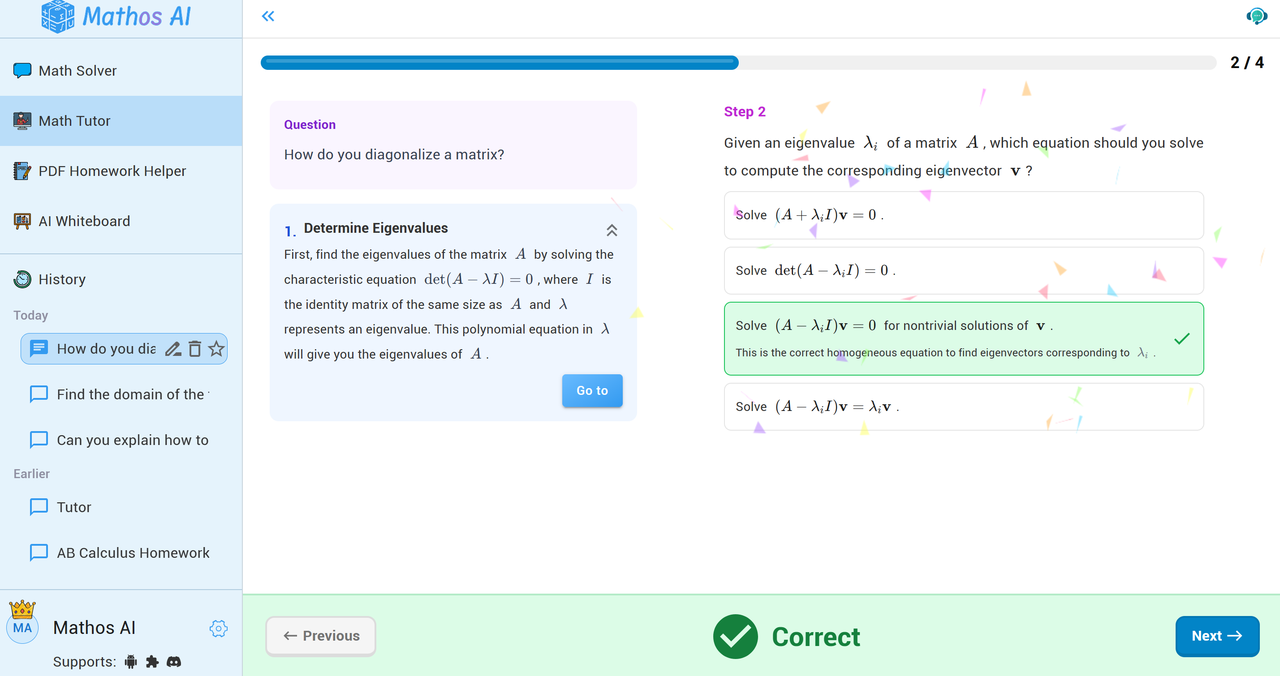
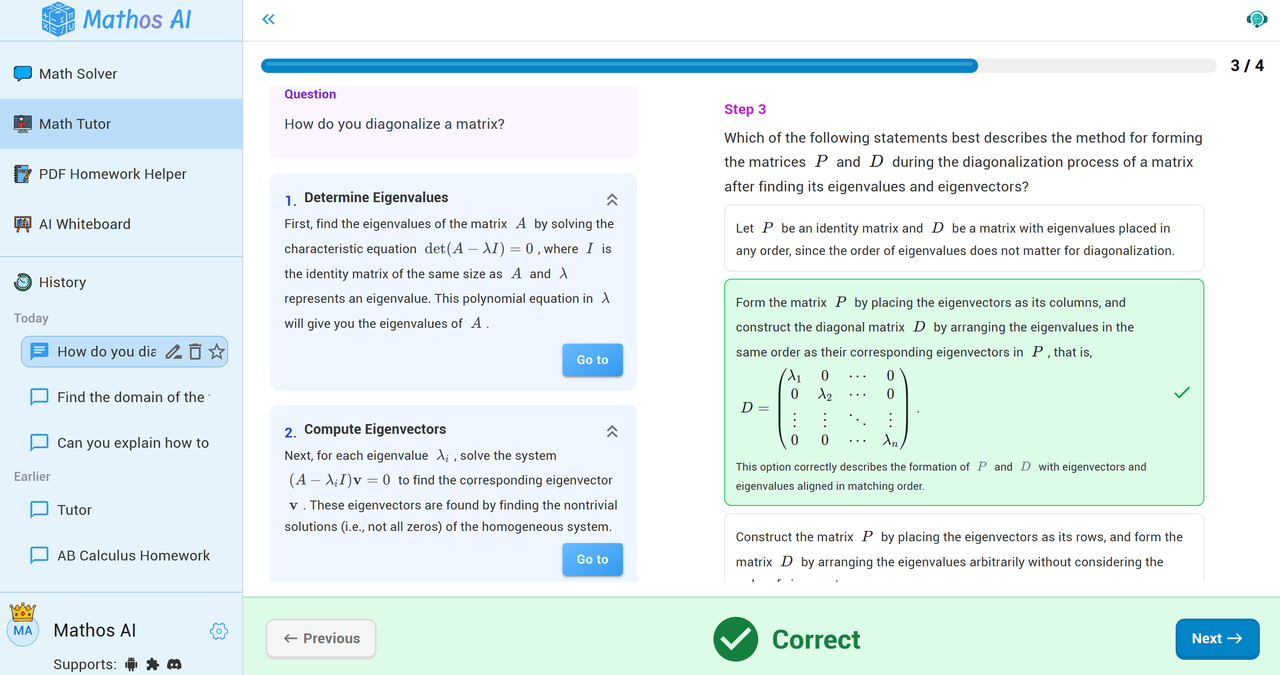
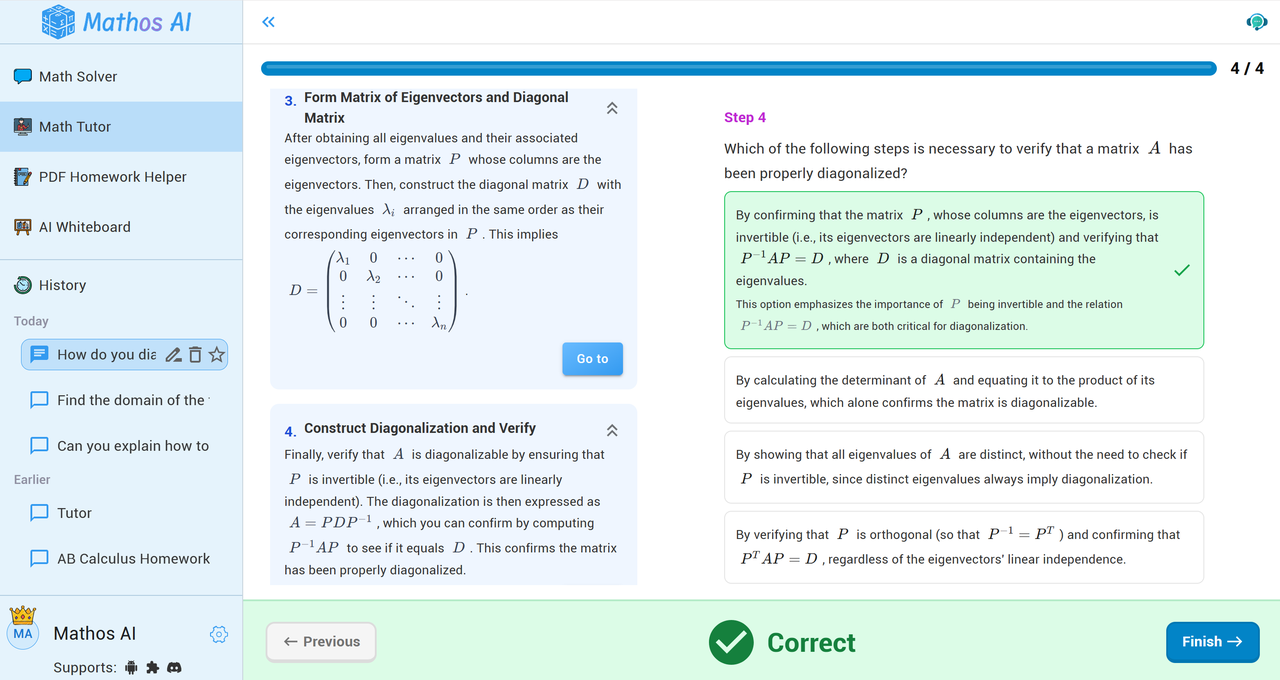
Mathos AI seems very ready! It breaks down the explanation into clear steps, like a recipe for solving a math problem. It asks a question ("How do you diagonalize a matrix?") and then guides you through the steps to find the answer. It's like a real teacher is saying, "Okay, let's tackle this together, step by step!" Mathos AI tries to be clear by using numbers for each step (Step 1, Step 2, etc.). It also uses math equations to show you what to do. Mathos AI uses a step-by-step approach, which is a good way to learn. It's like building with LEGOs – you start with one piece and then add another. It also asks questions along the way to make sure you're following. The green checkmarks and the "Correct" message give you feedback. Mathos AI's step-by-step method and feedback could be a really cool way to learn! It's like having a personal AI tutor guiding you through each part of the puzzle.
Which AI Math Homework Helper is Right for You?
Mathos AI and Opennote.ai are both outstanding solutions in the rising field of AI-mediated learning. Opennote.ai takes its place as a complete study aid, offering multimedia in math, biology, and finance, with the help of dynamic videos, interactive charts, and easy teamwork with apps like Notion and GitHub. What Mathos AI concentrates on doing best: math mastery. Superior to ChatGPT by 20% in problem-solving, providing niche calculators on key areas of study, and including all-step instructions tailored to one’s personal rate and tastes, Mathos AI creates new benchmarks of math AI personalization.
- Try Opennote.ai. If you’re in search of a solution that makes note-taking streamlined and study organization streamlined and visualizes STEM topics, Opennote.ai is right for you. This platform is aimed at people who want to experience an exciting, technology-backed insight, which goes beyond mathematics and aligns flawlessly with available academic resources.
- Choose Mathos AI. If you set your sights on deep, mistake-free, and personalized math education, go with Mathos AI. Whether you are working through equations from a PDF, creating hard graphs, or even dissecting complex calculus problems accompanied by video walkthroughs, Mathos AI aims to make you understand more by providing both the answer as well as explanation behind the answer.
In the end, your ideal AI math tutor depends on what—and how—you’re trying to learn. In particular, Mathos AI is excellent as the most reliable and serious math AI tutor assisting over millions of students on its platform every month to acquire the needed resources for success.
Instead of just recording math problems, Mathos AI, this AI tutor will help you master math. We invite you now to watch how personalized, accurate, and surefooted educational direction can change the course of your learning.

© 2025 Mathos. All rights reserved
Mathos can make mistakes. Please cross-validate crucial steps.






© 2025 Mathos. All rights reserved
Mathos can make mistakes. Please cross-validate crucial steps.