
Mastering Linear Equations: Definition, Formulas, Graphs, and Easy Examples
Monday, November 25, 2024

I understand you—linear equations can seem like this big, scary topic, especially if you're just starting. If you’ve ever felt stuck staring at a math problem, wondering what on earth a linear equation is or how to make sense of those formulas, you’re not alone. Understanding linear equations is crucial, whether you're tackling algebra homework or trying to ace a math exam. Trust me, however, once you break it down, it’s not that tough.
In this guide, I’ll walk you through the basics, from the definition of linear equations to some straightforward examples for 8th-grade and college students, from which you can practice independently. And yes, we will simplify those often seemingly complicated formulas. In the end, you’ll have the hang of it and feel more confident working through these problems.
What is a Linear Equation?
A linear equation is a mathematical statement that looks pretty straightforward. What is important here is that all ( or ) variables have an exponent of . In simpler terms, linear equations don’t mess around with things like , square roots, or anything too fancy. That’s why they’re called "linear," meaning they’ll be a straight line if you graph them.
Linear equations can have one or two variables. For example:
- A linear equation in one variable:
- A linear equation in two variables:
In both cases, A, B, and C are numbers called coefficients and constants, and x and y are the variables (unknowns) we are trying to solve. The main job is to get the value for these variables so that both sides of the equation match or are adjacent (like two perfectly level seesaws).
What are the 3 Formulas of Linear Equations?
Now, let’s dive into the three key forms in which linear equations can be written:
- Standard Form: This is written as , where , , and are integers. It's handy for identifying intercepts and comparing equations quickly.
- Slope-Intercept Form: Perhaps the most popular one, is , where is the slope (how steep the line is), and is the y-intercept (where the line crosses the -axis). This is great when you’re plotting a line on a graph.
- Point-Slope Form: If you know a point on the line and its slope, use , where is a known point and is the slope. This form is perfect for quickly writing an equation when you already have some key information.
Understanding the Linear Equation Graph
Picture you drawing a line directly from your front door to the park: no twists or bends, just a single straight path. That’s essentially what the graph of a linear equation looks like. When plotted on a graph, linear equations always form straight lines, which can be vertical, horizontal, or slanted depending on the equation.
- For equations like , you’ll get a vertical line.
- Equations like y = b form a horizontal line.
- You'll usually see slanted lines where , determined by the slope and intercept .
Knowing how to read these graphs can help you quickly find solutions to equations by looking at where the line crosses the -axis or -axis.
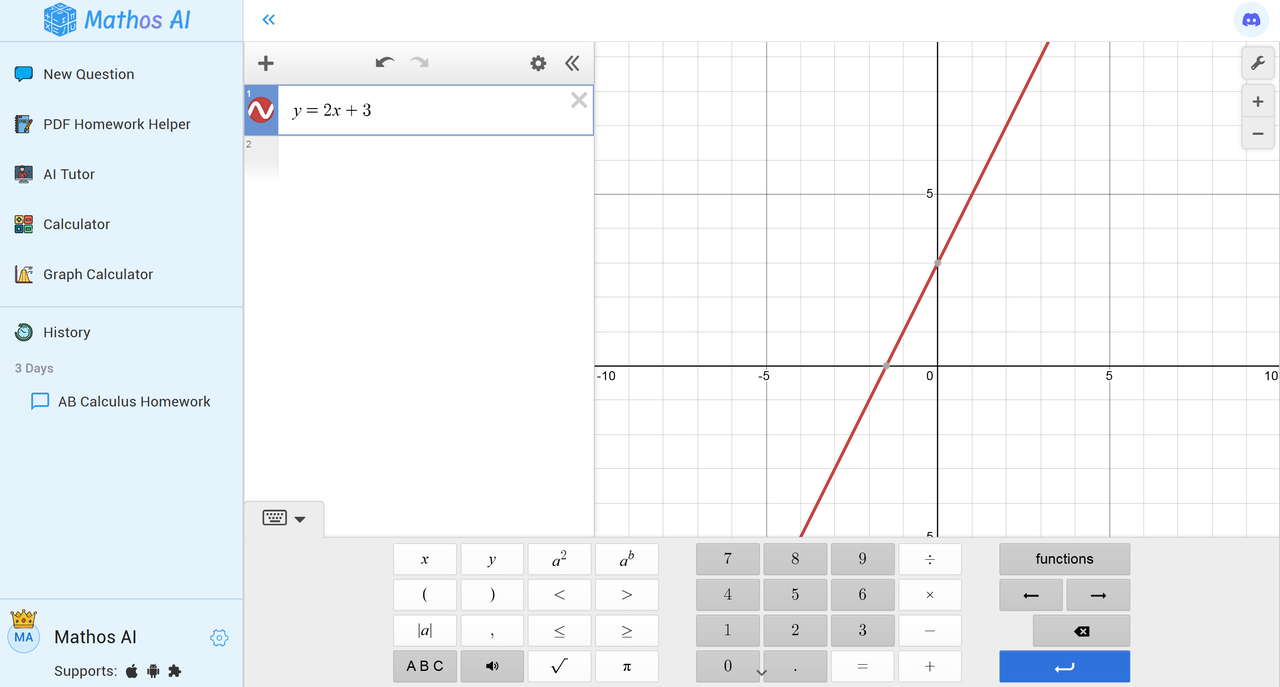
The good news I bring here is that using Mathos AI’s graph calculator, you can visualize how the slope or intercept in the line changes the line’s position and direction by choosing appropriate values for its slope and intercept. See how the linear equation shows on the Mathos Graph Calculator—it’s a great way to get a solid grasp of linear equations!
How to Use Mathos Graphing Calculator
- Enter the Equation: Type your equation into the input field.
- Choose Graphing Function: Select the type of graph you'd like to plot—linear, quadratic, or any other function.
- Click ‘Graph’: Hit the 'Graph' button to visualize your equation.
- Analyze the Graph: Mathos AI will generate a detailed, interactive graph of the equation, showing you key points like intercepts and slopes.
- Review Steps: Follow the step-by-step explanation to understand how the graph was calculated and plotted.
What You'll See
- The graph of this equation will be a straight line.
- It will intersect the -axis at (the -intercept).
- The slope () is , meaning the line rises by units for every unit it moves to the right.
How to Solve Linear Equations: Examples & Answers
Linear Equations Math Question for 8th Grade Students
Let’s say we have the equation:
How do we solve it? Easy! We just need to isolate :
- Add 5 to both sides:
- Divide by 3:
So, the solution is .
Linear Equations Math Question for College Students
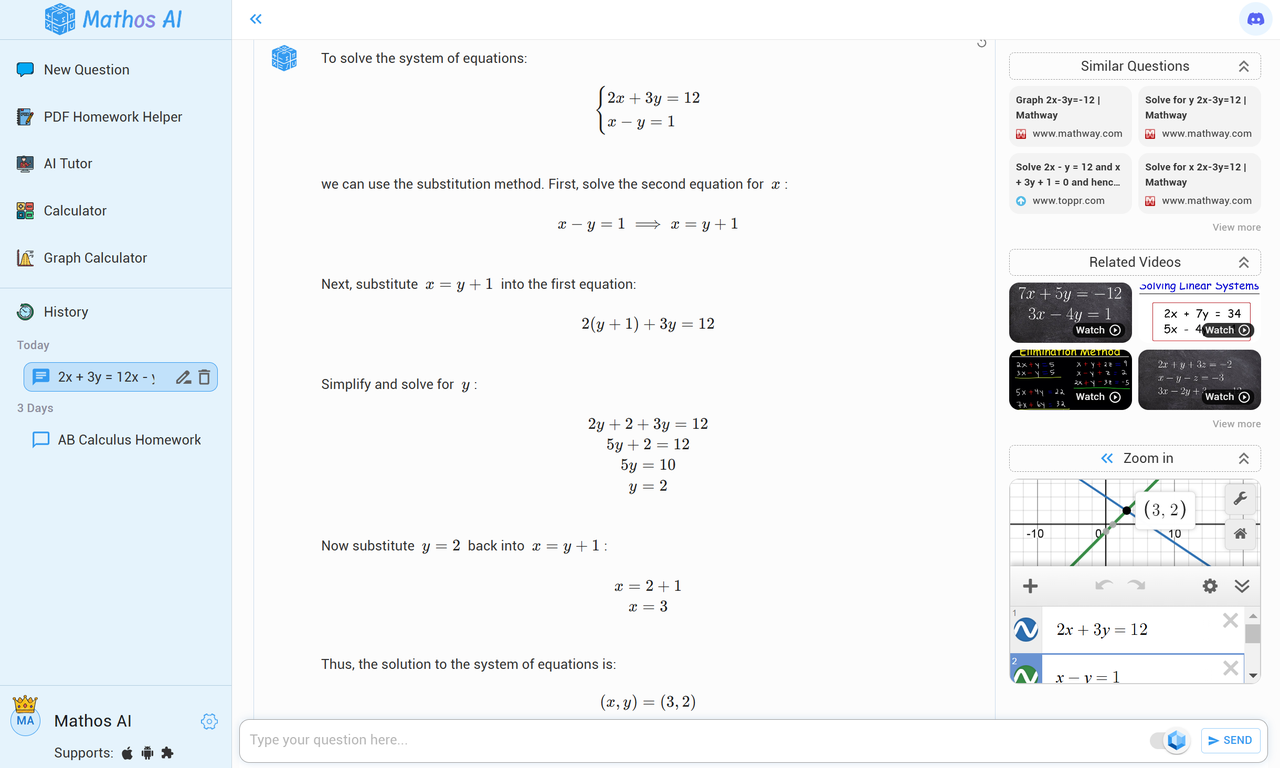
Now, let’s tackle a two-variable equation:
To solve this problem, you can use the substitution method:
- Rearrange the second equation:
- Substitute in the first equation:
- Simplify: ;
- Subtract 2 from both sides and divide by :
Then, substitute back:
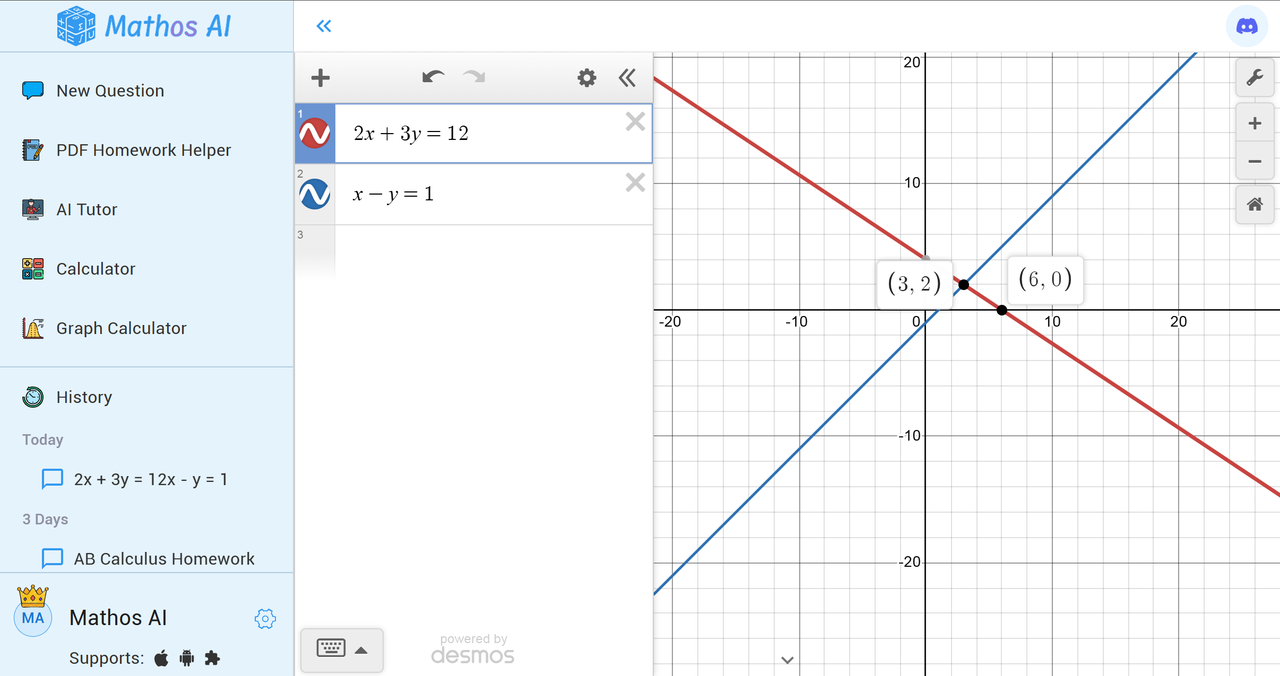
So, and .
Mathos AI can make solving this linear equation question easier. Below is how the Mathos Linear Equation Calculator works:
Or in an even more intuitive result, Mathos Graph Calculator will visualize an equation for you to help you understand this; just go there.
FAQs about Linear Equations
- How to Find the Equation of a Line? To find the equation of a line, all you need is its slope and a point on the line. Use the point-slope formula: . Adjust the equation to get it into slope-intercept form if needed.
- Are Linear Equations Considered Algebra? Yes, linear equations are a foundational part of algebra. They are the basic guys who teach you how to work with variables, constants, and basic algebraic equations, i.e. things you need to know for more advanced math topics.
- Are x Intercepts the Only Solutions for Linear Equations? Nope! So the -intercept is the point at which the line will cross the -axis (where ), but solutions can be anywhere on the line that satisfies the equation. An example is that if you plug in any -value, you will figure out a corresponding -value that also solves the equation.
Your Math Partner is Waiting
Whether you're just starting with linear equations or need extra practice for exams, mastering these concepts is essential for building a strong foundation in math. Count on Mathos AI when you need extra help with your homework. With Mathos PDF Homework Helper, you can easily solve math problems directly on PDFs by modifying, annotating, and taking notes within your study materials and receiving step-by-step solutions. With Mathos AI, you have a math tutor always available, wherever, whenever. Excellent for when you can’t remember how to do that tough math or need help getting your head around topics like calculus and scientific notation, Mathos AI is 20% more accurate than ChatGPT. Beyond accuracy, Mathos AI helps you think outside the box as it includes similar questions and links to videos from YouTube math channels, so you can find more resources for your math learning and get more practice if needed.
If you're tired of math tools offering superficial solutions, Mathos AI's dedicated calculators—such as the Scientific Calculator, Simplify Calculator, and Factoring Calculator—offer you accurate, instant, and step-by-step solutions. Mathos AI is already trusted by over 2 million students worldwide. Solving algebraic expressions or tackling more advanced math topics, like Laplace transform or the prime number, Mathos AI's tailored explanations can adapt to your learning style, making it an essential tool for homework help, self-study, and exam prep.
👉 Ready to polish your math skills? Ask Mathos AI Questions today and experience the difference!